
How to view hidden files and folders
Click on the hyperlink for instructions for that step.
To see a hidden file or folder do the following...
- Access folder options (This link will open in a different window)
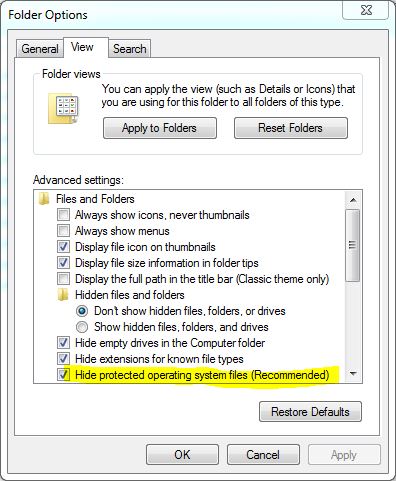
- Click on the View tab
 |
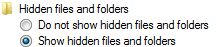
- Put the dot in Show hidden files and folders under Hidden files and folders.
 |
- Click OK
 |
If you want to hide the hidden files, just put the dot in Do not show hidden files and folders
Also if you need to make changes to protected operating system files, you will need to uncheck "Hide protected operating system files (recommended)"
 |
Here are other pages that may help you as well.
-
Information about moving a program to another computer
-
Information about backing up files in the event the computer crashes
-
There is a limit to how many files can be on the root of a drive